Skip to page content

Benefits of the C airBaltic programme

Collect airBaltic Club points with your everyday purchases and exchange them for flights.

Insurance that knows what it means to travel

Extensive travel insurance for you and your family, as well as purchase insurance.*

Everyday benefits

Up to 1500 EUR per month in cash withdrawals worldwide.

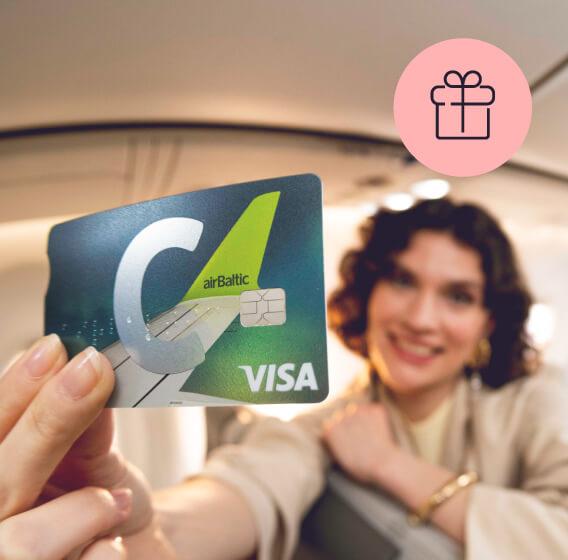
The girl is holding a C airBaltic card

When? Right now! New customers get 3000 airBaltic Club points free.**

With the C airBaltic card, everyday purchases work in your favour!

  • Become a Citadele customer and apply for a C airBaltic card.
  • Add the card to your airBaltic Club account in the mobile app.***
  • Receive 3000 airBaltic Club points in your airBaltic Club account.
  • Continue collecting points for everyday purchases (1 EUR = 1 point) and exchange them for flights and other airBaltic Club benefits.

** The offer does not apply to customers who have been Citadele customers within the last 6 months. This restriction does not apply to customers who are not Citadele customers as of 07.07.2026. The offer may be used only once.
*** To link your card to your airBaltic Club account and use all C airBaltic programme benefits, you need to download or update the Citadele app to the latest version (46.2+).

Benefits of the C airBaltic card programme

icon

airBaltic Club points

Receive airBaltic Club points for the everyday purchases you make with your card (1 EUR = 1 point) and exchange them for flights and other airBaltic benefits.

icon

Seat reservations

Want to sit by the window or disembark first? Choose your seat in advance for free.

icon

Heavy hand luggage

A total of 12 kg for your hand luggage and personal item.

icon

Other benefits

Earlier online check-in.
Airport check-in and luggage drop-off at the business class desk.
Priority boarding.
Free mobile data on your trips: 1 GB Saily eSIM.

The benefits apply to airBaltic flights booked through the airBaltic website or app under the name of the card holder and paid for with the C airBaltic card, including one-way and return tickets. The airBaltic Club benefits will be added to the reservation and can be viewed on the airBaltic website under Manage after purchase.

Insurance that knows what it means to travel

  • The card fee already includes travel insurance for you and your family when you travel abroad. Coverage per trip: up to 300 000 EUR.
  • Baggage insurance up to 1500 EUR. Baggage delay of more than 4 hours up to 700 EUR.
  • Trip cancellation, suspension, missed connection flight up to 3500 EUR.
  • Rental car deductible in accordance with your rental agreement when travelling abroad: up to 2000 EUR.
  • Purchase insurance: theft, damage or destruction for 180 days after picking up a product. Total coverage amount of 10 000 EUR, coverage per incident of 5000 EUR.

* Insurance service provided by Compensa Vienna Insurance Group ADB Latvian Branch, represented by insurance agent AS Citadele Banka.

Saily logo

1 GB free Saily eSIM for your travels!

Activate your free 1 GB Saily eSIM, valid in more than 50 countries.

  • Check that your device supports eSIM.
  • Copy the code from the airBaltic Club section in the Citadele mobile app.
  • Go to the activation page and enter the code.
  • Install the eSIM profile on your device.

Got plans? We have a solution

C airBaltic will help you achieve your plans and goals. Apply for a credit limit of up to 15 000 EUR – no need to pay for any unused credit limit! Meanwhile, anything you do use gets up to 45 days interest free.

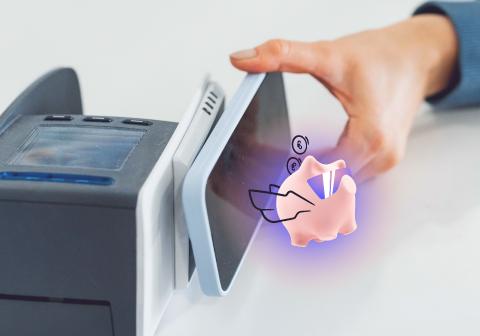
Person pays for a purchase with a phone, and the Citadele app’s smart piggy bank is visible on the screen.

Smart Piggybank: save as you spend

Smart Piggybank is a function in the Citadele app which rounds up your purchases and turns the extra into savings. Set up a piggybank, activate rounding up for your card, use it for purchases, and earn 3% per year*** on your savings. Try it – it’s easy!

*** Rate applies from 14.05.2025. Annual percentage rate may change. Interest is calculated from average monthly balance, assuming that a year is 360 days and a month is 30 days, and is paid out at the end of each month. Private customers can only open one Piggybank account. The maximum amount from which interest is calculated is 10 000 EUR. The government guarantees repayment of your deposits with Citadele up to 100 000 EUR. For more information, see Basic information on state-guaranteed deposit protection.

Priority Pass

Make use of the privileges offered by Priority Pass: visit more than 1900 business lounges in more than 500 cities in 145 countries. They are great places to relax or work, and to enjoy snacks and drinks before you fly.

Click to Pay payment symbol next to the VISA logo – an online payment option with Citadele C cards.

Click to Pay

Internationally recognized payment functionality that enables convenient and secure online payments without the need to re-enter card details. Click to Pay is also available for C cards and is supported by many online stores worldwide.

Apply for C card without visiting a branch

Apply remotely and become a Citadele customer today.

You will be able to use the online bank and digital services immediately.

You will receive your card by mail within 3-5 business days.

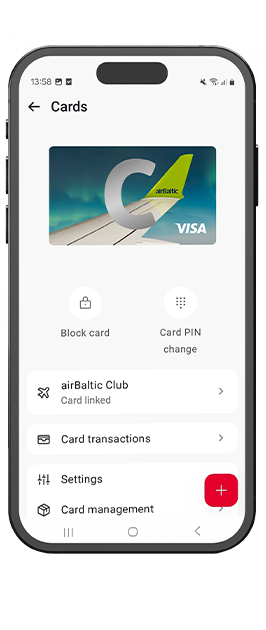
Smartphone screen with the Citadele mobile app open, displaying the Cards section with the visual of the C airBaltic card and available card management functions.
Smartphone screen with the Citadele mobile app open, displaying the Cards section with the visual of the C prime lava card and available card management functions.
photo

For customers

Order your new card in mobile app
or Online bank

Other application methods

online banking

Get your card within 15 minutes

No time to wait? Go to the branches Citadele and Spice and receive your card immediately.

Apply
branch

Branch

Make an appointment by filling out the form.

Find your nearest branch
online banking

Get your card within 15 minutes

No time to wait? Go to the branches Citadele and Spice and receive your card immediately.

Apply
branch

Branch

Make an appointment by filling out the form.

Find your nearest branch

Need help?

Get instant answers to your questions 24/7 from our website help tool: our virtual financial consultant, Adele.

 You can find information here

Please see information on airBaltic homepage: Spend points on prizes, Spend points on flights.

For the code not showing in the app — Citadele: +371 67010000 / info@citadele.lv

For activation issues — Saily Help Center: saily.com, support.saily.com

If you have your card activated and it is linked with your airBaltic profile, then please allow for up to 24 hours for the bonuses to be added to your reservation. You will see them in your reservation on airBaltic app and webpage. If it has been more than 24 hours, please contact airBaltic (Phone: +371 67130607 (Mon-Fri 09:00-18:00), e-mail travel@AirBaltic.com; +371 67130607) for more detailed investigation.

Phone: +371 67130607 (Mon-Fri 09:00-18:00)

E-mail travel@AirBaltic.com, with SLA 72hrs

You can join C airBaltic card program if you are a Citadele private client who is of legal age and holds C airBaltic card.  To join  C airBaltic card program, you need to link your C airBaltic card to your airBaltic Club account in Citadele mobile application. If you do not yet have an airBaltic Club account, you must first create one at www.airbaltic.com and then link it to your C airBaltic card. 

You can complete the linking through the Citadele mobile application as follows:

  • log in, navigate to Cards, select C airBaltic, and link your C airBaltic card to your airBaltic Club account;
  • enter an email address associated with your airBaltic Club account;
  • If the email address is linked to your airBaltic Club account, you will receive an one-time password from airBaltic by email. The one-time password must be entered in Citadele mobile application registration form to complete the process;
  • If the email address is not linked to your airBaltic Club account, you will receive instructions on how to create an airBaltic Club account. If the email is already connected to another C airBaltic card, you will be advised to update the information through your airBaltic Club account.

To qualify for the airBaltic benefits, a customer must:

  • hold a C airBaltic card in their name and pay with it for the flights booking at airBaltic.com website or via airBaltic Club app;
  • have the C airBaltic card linked to their airBaltic Club profile in their name;
  • enter their airBaltic Club membership number during the booking process before the flight;
  • to receive airBaltic travel benefits related to the flight, the customer must pay for the booking with a linked C airBaltic card in their name and travel on the flight.

Benefits apply only to the airBaltic operated scheduled flights.

Exceptions for airBaltic benefits: If a booking includes multiple passengers - Customer A, Customer B, and Customer C - the benefits are applied individually based on whether each passenger has a C airBaltic card linked to their own airBaltic Club profile.

It is not possible to upgrade or downgrade from another C  card to C airBaltic card.

When ordering C airBaltic card, you will receive a new account with a new IBAN and a new card.

Travel-related benefits apply only to flights operated by airBaltic and purchased through airBaltic sales channels.

C airBaltic card has its own dedicated program and benefits. Discounts or offers available for other Citadele cards, such as trial period, member get member or active user discount do not apply to this card.

Purchases made with the C airBaltic card also do not earn C Rewards points, as it is part of a separate loyalty program.

Yes, you can continue to use your accumulated airBaltic Club points regardless of your card status.

However, airBaltic program benefits are only applied when flight tickets are purchased using the C airBaltic card. If you use another card for the purchase, these benefits will not apply.

You can complete the linking through the Citadele mobile application as follows:

log in, navigate to Cards, select C airBaltic, and link your C airBaltic card to your airBaltic Club account;
enter an email address associated with your airBaltic Club account;
If the email address is linked to your airBaltic Club account, you will receive an one-time password from airBaltic by email.

The one-time password must be entered in Citadele mobile application registration form to complete the process;

If the email address is not linked to your airBaltic Club account, you will receive instructions on how to create an airBaltic Club account. If the email is already connected to another C airBaltic card, you will be advised to update the information through your airBaltic Club account.

If you have multiple airBaltic Club accounts, you can unlink the card and link it to a different profile. However, airBaltic Club points cannot be transferred between different profiles.

Points you have already earned will remain in your airBaltic Club account.

After unlinking, you will no longer earn new airBaltic Club points or receive airBaltic travel‑related benefits.

You can continue using your card for payments as usual.

You can view the history of your points usage in your airBaltic Club account.

No, airBaltic Club points can only be exchanged for the rewards offered by the airBaltic Club loyalty program.

No need to present anything. All information will be added to your booking info and be visible on your boarding pass.

You will receive benefits if you pay with card and mix with the airBaltic Club points via Slider option.

You will not receive benefits if you use the following services:

  • partial payment (pay for your trip in instalments);
  • freeze my prize (lets you book your flight but postpone payment for up to 48 hours for a non-refundable fee);
  • gift cards and prepaid vouchers;
  • reward tickets (tickets bought by points);
  • and also Interlines and Codeshares are not eligible for benefits assignment, only flights operated by airBaltic.

It comes automatically with your C airBaltic card. Open the Citadele mobile app → Cards → C airBaltic — your unique 25-character eSIM coupon code is displayed there.

The C airBaltic card program is a loyalty program provided by Citadele that allows you to earn airBaltic Club points through purchases made with your C airBaltic card.

The points are credited to your airBaltic Club account, and their use, redemption, and validity are determined by airBaltic according to airBaltic Club terms and conditions.

In addition to earning points, the program also provides travel‑related benefits when travelling with airBaltic.

You can start using the program once you link your card to your airBaltic Club account.

 You can find information here

Please see information on airBaltic homepage: Spend points on prizes, Spend points on flights.

For the code not showing in the app — Citadele: +371 67010000 / info@citadele.lv

For activation issues — Saily Help Center: saily.com, support.saily.com

If you have your card activated and it is linked with your airBaltic profile, then please allow for up to 24 hours for the bonuses to be added to your reservation. You will see them in your reservation on airBaltic app and webpage. If it has been more than 24 hours, please contact airBaltic (Phone: +371 67130607 (Mon-Fri 09:00-18:00), e-mail travel@AirBaltic.com; +371 67130607) for more detailed investigation.

Phone: +371 67130607 (Mon-Fri 09:00-18:00)

E-mail travel@AirBaltic.com, with SLA 72hrs

You can join C airBaltic card program if you are a Citadele private client who is of legal age and holds C airBaltic card.  To join  C airBaltic card program, you need to link your C airBaltic card to your airBaltic Club account in Citadele mobile application. If you do not yet have an airBaltic Club account, you must first create one at www.airbaltic.com and then link it to your C airBaltic card. 

You can complete the linking through the Citadele mobile application as follows:

  • log in, navigate to Cards, select C airBaltic, and link your C airBaltic card to your airBaltic Club account;
  • enter an email address associated with your airBaltic Club account;
  • If the email address is linked to your airBaltic Club account, you will receive an one-time password from airBaltic by email. The one-time password must be entered in Citadele mobile application registration form to complete the process;
  • If the email address is not linked to your airBaltic Club account, you will receive instructions on how to create an airBaltic Club account. If the email is already connected to another C airBaltic card, you will be advised to update the information through your airBaltic Club account.

To qualify for the airBaltic benefits, a customer must:

  • hold a C airBaltic card in their name and pay with it for the flights booking at airBaltic.com website or via airBaltic Club app;
  • have the C airBaltic card linked to their airBaltic Club profile in their name;
  • enter their airBaltic Club membership number during the booking process before the flight;
  • to receive airBaltic travel benefits related to the flight, the customer must pay for the booking with a linked C airBaltic card in their name and travel on the flight.

Benefits apply only to the airBaltic operated scheduled flights.

Exceptions for airBaltic benefits: If a booking includes multiple passengers - Customer A, Customer B, and Customer C - the benefits are applied individually based on whether each passenger has a C airBaltic card linked to their own airBaltic Club profile.

It is not possible to upgrade or downgrade from another C  card to C airBaltic card.

When ordering C airBaltic card, you will receive a new account with a new IBAN and a new card.

Travel-related benefits apply only to flights operated by airBaltic and purchased through airBaltic sales channels.

C airBaltic card has its own dedicated program and benefits. Discounts or offers available for other Citadele cards, such as trial period, member get member or active user discount do not apply to this card.

Purchases made with the C airBaltic card also do not earn C Rewards points, as it is part of a separate loyalty program.

Yes, you can continue to use your accumulated airBaltic Club points regardless of your card status.

However, airBaltic program benefits are only applied when flight tickets are purchased using the C airBaltic card. If you use another card for the purchase, these benefits will not apply.

You can complete the linking through the Citadele mobile application as follows:

log in, navigate to Cards, select C airBaltic, and link your C airBaltic card to your airBaltic Club account;
enter an email address associated with your airBaltic Club account;
If the email address is linked to your airBaltic Club account, you will receive an one-time password from airBaltic by email.

The one-time password must be entered in Citadele mobile application registration form to complete the process;

If the email address is not linked to your airBaltic Club account, you will receive instructions on how to create an airBaltic Club account. If the email is already connected to another C airBaltic card, you will be advised to update the information through your airBaltic Club account.

If you have multiple airBaltic Club accounts, you can unlink the card and link it to a different profile. However, airBaltic Club points cannot be transferred between different profiles.

Points you have already earned will remain in your airBaltic Club account.

After unlinking, you will no longer earn new airBaltic Club points or receive airBaltic travel‑related benefits.

You can continue using your card for payments as usual.

You can view the history of your points usage in your airBaltic Club account.

No, airBaltic Club points can only be exchanged for the rewards offered by the airBaltic Club loyalty program.

No need to present anything. All information will be added to your booking info and be visible on your boarding pass.

You will receive benefits if you pay with card and mix with the airBaltic Club points via Slider option.

You will not receive benefits if you use the following services:

  • partial payment (pay for your trip in instalments);
  • freeze my prize (lets you book your flight but postpone payment for up to 48 hours for a non-refundable fee);
  • gift cards and prepaid vouchers;
  • reward tickets (tickets bought by points);
  • and also Interlines and Codeshares are not eligible for benefits assignment, only flights operated by airBaltic.

It comes automatically with your C airBaltic card. Open the Citadele mobile app → Cards → C airBaltic — your unique 25-character eSIM coupon code is displayed there.

The C airBaltic card program is a loyalty program provided by Citadele that allows you to earn airBaltic Club points through purchases made with your C airBaltic card.

The points are credited to your airBaltic Club account, and their use, redemption, and validity are determined by airBaltic according to airBaltic Club terms and conditions.

In addition to earning points, the program also provides travel‑related benefits when travelling with airBaltic.

You can start using the program once you link your card to your airBaltic Club account.

Any questions about airBaltic flight benefits?


airBaltic information service:
+371 67130607 (business days 9.00-18.00)
travel@airBaltic.com.

Find out more